



Facebook Spaces

When Facebook acquired Oculus a few years back, there where speculations on how the social media giant would integrate VR into its application. After all, given Mark Zuckerberg’s strong support for the technology, it wouldn’t have been far fetched to assume that Facebook would go VR sooner or later.
To this effect, Facebook recently announced it’s VR add-on called Facebook Spaces. While at the moment still in beta and definitely still not for everyone, it nevertheless marks the beginning of the direction current digital social media networking will move towards the future.
Whatever technology social media will be driven to use, the objectives will still be the same. To socialize, communicate and make friends and VR has such great potential in doing just that.
Current Facebook users have to contend with posting messages, audio and video on their individual timelines or sharing them to other specific pages for friends and acquaintances to see. Direct communication is established through text, audio and video via the Messenger feature. For groups, there is always group chat or direct comments on posts.
Majority of today’s social media users are used to these methods of communication but let’s just say for the sake of continual human evolution, if there is a way to do things better, people are bound to use it. After all, if mankind got satisfied with Morse Code we’d still be sending telegrams to each other today.
VR opens a lot of possibilities, though its accessibility as of today is very limited. The hardware demand is quite steep and expensive. Only a small percentage of the current Facebook population can afford the high-end PC and Oculus HMD system required for practical access, much less to take full advantage of Facebook VR. For those few who already have the equipment, Facebook Spaces offers an interactive and immersive virtual environment that can be likened to social media games like Twinity and Second Life.
As this Facebook feature is still in beta, performance is still not that optimized and several bugs still have to be ironed out. The environment however virtually borders between breathtaking and amusing. To get to that Facebook environment, you will have to download the client app from the Oculus store to use with your headset and controllers. Once in VR you will have to take- off your headset for a moment to log-into your actual Facebook account. Returning to VR, once you’ve entered Facebook Spaces, you will find yourself in your own VR space that has a table and an interactive menu dock in the center of it. Simply point your index finger at the menu option on the dock that you wish to perform and tap it.
Again, this Facebook feature is still in beta so there are still only a few things that you can do but it’s just the beginning and more features and capabilities are likely to be added to it. Current options include Media, Tools, Friends, Appearance, Drawings, Settings and Move.
The Media option lets you view photos and videos in your space which you can select from the following locations: Timeline, these are media you’ve created and shared. Saved, media saved on Facebook. Following, media shared by friends and those that you follow and Explore, which are 360 Deg photos recommended to you.
The Tools option presents you with 3 sub-options. These are: Mirror, obviously to scrutinize your appearance, Marker which lets you draw images you can duplicate or save and the Selfie-stick used to take pictures of yourself or to report a performance bug.
Friends. You can invite and chat with up to 3 of your Facebook friends. You can invite them directly into your FB Space or give them a video call in VR via Messenger. It is recommended however that they should be on-line on FB and Oculus equipped like you. Likewise, your friends can invite you into their space as well.
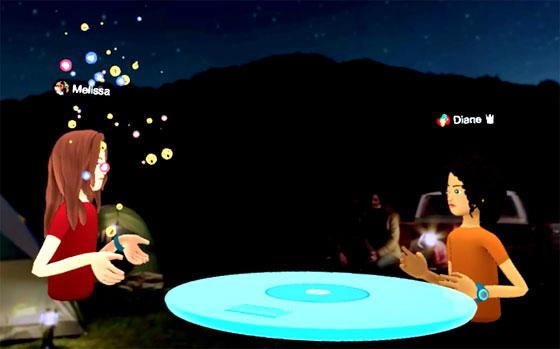
Appearance is used to customize the way you look in VR. You will have to create your own special avatar. You do this by choosing a tagged photo of yourself on FB which the application will base your initial look on. You then have the option to customize and polish your look by choosing available options similar to creating your avatar when playing social gaming or MMORPG. This is how you will look like to your friends when in FB VR.
Drawings let you view the drawings you’ve saved. Settings lets you adjust your user preferences like resetting everything, adjusting the table position, remembering your log-in info and to log-off Spaces and your FB account. Finally, Move lets you move around the table in your space.
There are other sub-options that you can perform but it’s best to learn about them in practice. No worries as the user interface is quite intuitively interactive. Space can be described as a room where you and your friends can meet online in VR. You can vary the look of the room from a representation of your own living room to almost any other location you can think of which can at times result in some amusing environment.
FB VR may be limited as of today but with the continual advancement and accessibility of VR technology, FB Spaces is one feature that looks very very promising.
Follow us on Facebook
Articles
 Interesting Puzzle Games You Should Play in Virtual Reality
VR has opened up a huge potential for practically all the game genres in existence today. One of them is the Puzzle Game. Let's take a look at a few puzzle games worth the play in VR.
Interesting Puzzle Games You Should Play in Virtual Reality
VR has opened up a huge potential for practically all the game genres in existence today. One of them is the Puzzle Game. Let's take a look at a few puzzle games worth the play in VR.
 Everything We Know about Apple's $3,499 Vision Pro
Apple's new mixed-reality headset was recently introduced this year at the Worldwide Developers Conference. It isn't cheap, and it isn't just ordinary either. Let's take a peek at how advanced tech Apple has gone this time.
Everything We Know about Apple's $3,499 Vision Pro
Apple's new mixed-reality headset was recently introduced this year at the Worldwide Developers Conference. It isn't cheap, and it isn't just ordinary either. Let's take a peek at how advanced tech Apple has gone this time.
 Future Plans for Manga VRMMORPG
Manga based online massive multi-player RPG games are one of the most popular genres around today. As to whether it would be effectively possible to adapt this art style into VR gaming is something worth the see.
Future Plans for Manga VRMMORPG
Manga based online massive multi-player RPG games are one of the most popular genres around today. As to whether it would be effectively possible to adapt this art style into VR gaming is something worth the see.
 5 Most Anticipated Upcoming VR Games for 2021
A bunch of new VR games are scheduled to be released this year. Let's take a quick peek at five of the most anticipated ones.
5 Most Anticipated Upcoming VR Games for 2021
A bunch of new VR games are scheduled to be released this year. Let's take a quick peek at five of the most anticipated ones.
 Steam's VR Game of the Year Award: Who Will Win?
The selection for Steam's VR Game of the Year Award will be a tough one as the VR games on the list are really good. However, just like in every competition, there will always be one who will stand out among the rest.
Steam's VR Game of the Year Award: Who Will Win?
The selection for Steam's VR Game of the Year Award will be a tough one as the VR games on the list are really good. However, just like in every competition, there will always be one who will stand out among the rest.
 The Future Impact of VR Gaming
The rise of VR in 2016 has started a change on how people play games. It may take some time but it will definitely change the gaming industry in the times to come
The Future Impact of VR Gaming
The rise of VR in 2016 has started a change on how people play games. It may take some time but it will definitely change the gaming industry in the times to come
 Are Virtual Reality Games Making a Comeback during the Pandemic?
The current outbreak situation has greatly affected the gaming industry. Let's check if VR Gaming is currently growing or dwindling this time of the Pandemic.
Are Virtual Reality Games Making a Comeback during the Pandemic?
The current outbreak situation has greatly affected the gaming industry. Let's check if VR Gaming is currently growing or dwindling this time of the Pandemic.
More Articles
 Which Genshin Impact Characters Are Worth Pulling for and Improving?
Genshin Impact has many characters, and you may wonder who is worth pulling for and who among your roster is worth improving.
Which Genshin Impact Characters Are Worth Pulling for and Improving?
Genshin Impact has many characters, and you may wonder who is worth pulling for and who among your roster is worth improving.
 Farm Games for Kids
Farm games are a lot of fun, but what about your little ones, are there games that they can enjoy too? In this article we will see if we have any games that your children can play.
Farm Games for Kids
Farm games are a lot of fun, but what about your little ones, are there games that they can enjoy too? In this article we will see if we have any games that your children can play.
 Mahjong Games on Mobile
Mobile gaming is taking over, and Mahjong games are moving there all the time and in this article we will discuss this new trend.
Mahjong Games on Mobile
Mobile gaming is taking over, and Mahjong games are moving there all the time and in this article we will discuss this new trend.
 8 History-themed Games and Franchises You Need to Play Today
In recent years, there’s been a rise of history-themed games, and as someone who loves Ancient Rome and the medieval era, it’s fantastic to have the following options:
8 History-themed Games and Franchises You Need to Play Today
In recent years, there’s been a rise of history-themed games, and as someone who loves Ancient Rome and the medieval era, it’s fantastic to have the following options: